ChopWin Registration
Creating an account with ChopWin Gambia is fast, secure, and designed for smooth access to slot entertainment. The ChopWin registration process requires only basic details and takes less than a minute to complete. Gambian players can easily register on ChopWin Gambia using their mobile number and set up a protected gaming profile. Once registered, players can explore slot titles, activate welcome bonuses, and manage deposits and withdrawals without complications. Gambian players can begin spinning reels immediately.
ChopWin registration process - how to create a new account
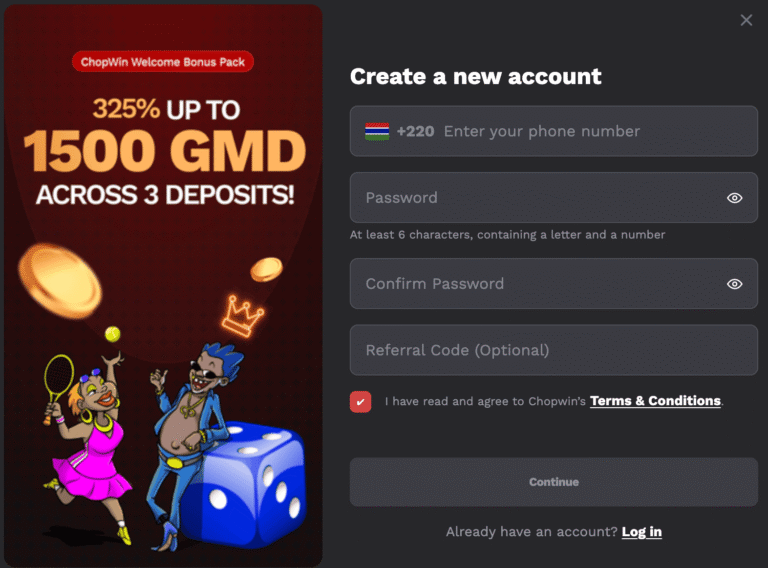
See the detailed step-by-step process on how to create a new ChopWin account securely:
- Open the official platform and begin the ChopWin registration by selecting the sign-up option on the homepage, located in the top-right corner.
- Enter your phone number with the +220 country code.
- Choose a strong password (containing at least six characters, including letters and numbers), then confirm it correctly.
- Add a referral code if available, though this step is optional for Gambian players.
- Accept the Terms & Conditions and press Continue.
- After registration is completed, you can immediately log in your ChopWin new account and start playing slots.
Account verification (KYC) after registration
ChopWin account verification helps protect players and ensures secure withdrawals and transactions.
- Open your ChopWin new account and select the verification section.
- Upload valid identification documents, such as a national ID or passport.
- Provide additional information if requested.
- Submit the documents and wait for confirmation.
- Once approved, full account features become available.
Registration problems?
Even though the ChopWin registration is a smooth process, some Gambian players may encounter problems with this process. See below the possible problems & how to quickly fix them:
- Phone number already registered
If the system shows your number is already in use, try logging in instead of registering again. If you forgot your password, use the password recovery option to restore account access and continue playing normally. - Weak or incorrect password format
The platform requires a password with at least six characters, including letters and numbers. Create a stronger password, avoid spaces, and confirm it correctly before submitting the registration form. - Verification code or confirmation issues
If confirmation messages do not arrive, check your network connection and ensure your phone number is entered correctly. Wait a few minutes and request a new verification message if necessary.